
Recently, a client told me we needed to redesign the main data-entry form of their company’s flagship product. Customers said they didn’t like the form in our client’s SaaS or cloud-based software. Despite extra training, customers still felt apprehensive and intimidated by its complexity.
The online form was built a few years earlier, without a designer—as is typical of start-ups. But the product owner said customers wanted the software to be easier to learn and use.
We were tasked with simplifying the main data-entry form. We did this by simplifying the mental model from one we called “Surprise juggling” to one called “Got gossip? Fill me in”.
Our user research and analysis proved that the new mental model let users work faster with fewer errors.
To simplify, we changed the mental model
And we succeeded. By changing the mental model—the way users believe the data-entry form to work—we managed to:
- make data entry feel simple and easy.
- reduce inaccurate data and increase data quality.
- help users discover existing features that they had not been using.
- chop 60% off the data-entry time.
These improvements in user performance and user perception are based on GOMS calculations, feedback from the client’s customers, and self-reports by participants in two usability studies. All these gains came from changing the mental model, and adjusting the user interface to clearly reflect the new mental model.
What’s a mental model?
A mental model is a representation of how something works, which helps shape your approach to doing tasks. For example, you’re probably familiar with these mental models:
- Fast-food restaurant. You arrive, order your food, pay, receive your food, sit down, then eat.
- Fine-dining restaurant. You arrive, sit down, order your food, receive your food, eat, then pay.
The appearance of the restaurant helps you recognise what to do, and in what order.
Similarly, a mental model helps you complete your online task—especially if it closely resembles a real-world experience. For example:
- Online shopping. You visit a store website, look at products, put some products in your shopping cart, choose delivery, and then pay. Later, you may track the delivery online, and receive the product in person.
In addition to changing the mental model, we also improved the information architecture—the way information is organised and presented—by presenting different types of data together in one list, exactly where users had been looking for it. More about this later.
First, to understand how a mental model affected the users, in this case study, let’s look at how the product was, and then how it now is. …
The original, old mental model: Convoluted
We called the old mental model “Surprise Juggling” because it involved switching between—and potentially filling in—an unknown number of forms. Here is what it entailed.
The user’s task is to enter the details of each communication, so they can be tracked and reported to an industry regulator. In the original, old workflow, you would do this:
- Start a new Communication form. Enter what was said in the conversation, and on what date. Add a title, and say whether the record is confidential. Then Save the new form. In this old workflow, the new saved form stays open because you’re not done with it.

First step: Enter the basic details on one form, and then save it. - Start more forms—one for every Person, Organisation, and Staff member present, and every Topic and Attitude observed in the conversation. On each of these secondary forms, first search to see if a Person, an Organisation, a Topic, or an Attitude already has a form, to avoid creating duplicates. If not, create and Save it. Then link the new or existing records you want to the first form.
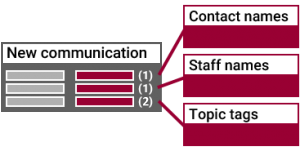
Next step: Enter additional details in separate forms, or find ones that were filled in previously. Link these forms to the main new form. (Confused yet?) - Return to the first form. In the old workflow, none of the linked information appears in the New Communication form. Instead, a counter shows the number of linked forms. For example, if you linked two Topics, “Safety” and “Noise complaint”, the counter only says Topics: (2). Now, Save the main form again or lose the linked information.
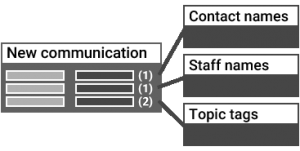
Then, return to the original form, check that the other forms are linked, and then save again. - Clean up your desktop by closing all the forms, including the new communication from step 1, which has now been saved at least twice.
In the old workflow, at this point we observed users taking an additional step, not technically needed. - View the report of Communications to confirm a record of the conversation is listed there. This compulsion to double-check reflects the uncertainty caused by the old, forms-juggling workflow: was the record created correctly and completely?
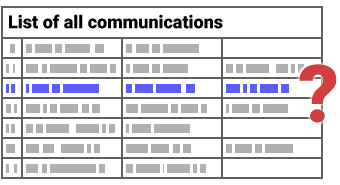
Extra step: Relieve doubt about task success by checking that the communication got saved.
What was the original mental model called?
It was a struggle to describe the original or old mental model in familiar, real-world terms. The user had to fill in a series of disjointed forms, and needed to juggle back and forth between an unknown number them. Users didn’t know how many forms they’d have to juggle—hence “Surprise Juggling”.
We wanted to—had to—change the mental model from Surprise Juggling to one that was clear and familiar.
The new mental model: “Got gossip? Fill me in”
The redesigned interface combines two simple mental models that work well for the clerks who do most of the data entry. Since the work is done in batches, the form supports keyboard navigation, and can be pinned so remains open after saving, ready to receive the next new communication.
- Fill in a form. This is a mental model most people understand, and—provided the information they need to fill in is readily available—represents an easy task.

Enter everything in one—seemingly simple—form that listens to the whole story, like water-cooler gossip. - Gossip. During the data-entry stage, a typical communication record now resembles gossip, a mental model that’s readily understood, because humans tend to like stories: “Who said what about whom, how, where, when—and what’s our view of it?” Eliciting a story adds a bit of interest to a boring data-entry task.
Of course, the gossip model is only suited for data entry. When reporting to the regulator, the user interface groups, sorts, and presents the information as a professional report.
With the new mental model in mind, we carefully redesigned the data-entry form.
Now, users only click Save once. Fill in all the details at once; no more double saving. Behind the scenes, the same two-stage saving still occurs, but there’s no need to reflect this implementation in the workflow or user interface.

Now users select items from lists. No more linking records. Behind the scenes, the linking of records still occurs, but there’s no need to mention that these are database records.

To reduce the number of controls, some types of items are now combined in one list, such as the people and groups that may be involved in a communication.
This is an information architecture change—we changed how the information is organised and where it is presented. From research with customers, we knew that they often mixed up people who speak as an individual, people who represent organisations, and people who are connected to land parcels—particularly since one human can be all three types of people. Particularly aggravating in the old workflow: the data-entry clerk first had to search for these records in three separate forms. Now, we present all three types of records in one searchable list on the data-entry form itself. As the data-entry clerk types, the list displays matching people, organisations, and land parcels to pick from. In the background, the system keeps track of what the data-entry clerk selects, and then updates multiple database tables—which a data-entry clerk doesn’t need to know about.
Now, users see fewer fields. No more lengthy form to fill—or so it seems. When the form appears, it is shorter. Additional boxes, or “fields”—the ones less used—are still available if the user clicks Show All, which lets users control the complexity on their screen.

Now, the labels support the mental model. The labels help connect the information into a story—the “gossip” of the new mental model.

Existing users who tested the new labels did not like the changed labels but were able to perform their tasks successfully, so we left the labels as designed. We later re-assessed the labels with first-time users, to confirm we got the mental model right.
Below left is a mock-up of the original form—but without its many supplemental forms. Notice the bottom two rows of text showing the counters and hyperlinks to the linked forms. In contrast, at right is a mock-up of the new form, which includes everything in one place. Some of it can be expanded in place to add more detail.
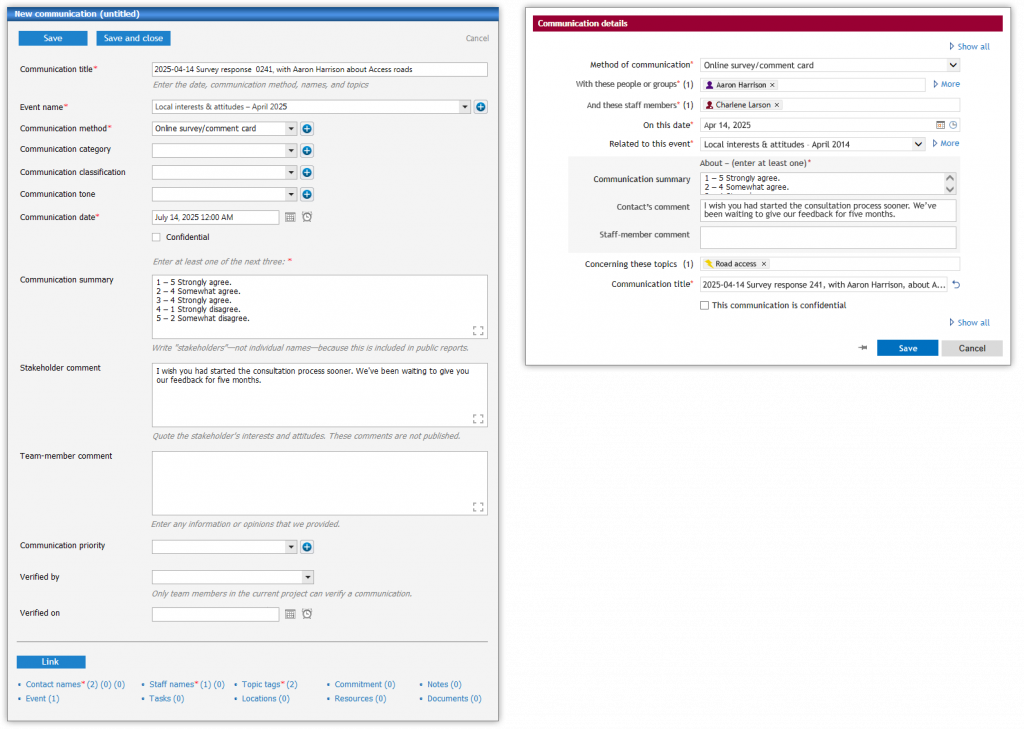
As with any re-design, this was an iterative process—a leap forward, but many more improvements followed.
User research and analysis: Improvements
Usability testing with users showed usability improvements that users:
- said their data entry was now simpler and easier.
- discovered existing features that they said they had not seen before.
Analysis of the database records showed further performance and usability improvements:
- The time between creating and saving a Communication record was 60% shorter. This is a reduction in data-entry time.
- A reduction in edits prior to periodic reporting. Qualitative research told us analysts review and correct all records before generating a report, so fewer edits suggest fewer data-entry errors.
Show the mental model, hide the inner workings
In this example, each form is for a separate database record, which the software then links to a communication record. After the redesign, the software still does that. However, data-entry clerks don’t need to know about the structure of the database or the multiplicity of records—so the user interface no longer reflects that.
Developers write programs that work. Developers who are proud of a particular solution may not understand why their solution should be hidden from users. But if the solution is complex, a good mental model keeps that solution out of sight, hidden behind the user interface.
It’s the job of usability analysts, user-experience designers, and software developers to work in tandem. Together, we identify suitable mental models and then clearly show these mental models through the user interface—even if it’s not an accurate reflection of what’s happening in the background.
The gap between the mental model—what the user thinks is happening—and the implementation model—what the developer built—is not a misrepresentation or an inaccuracy. It’s an additional layer that ensures our software products are more usable, users are more efficient, training costs are lower, support calls are fewer, and so on—all of which are legitimate business drivers.