
Eyetracking: “I’m typical”

If you’ve ever wondered where exactly on your web site or software your readers or users are looking, eye tracking will tell you that. The eye-tracking equipment emits a specific wavelength of light (invisible to humans) that helps the eye tracker to follow your eyes. As the light bounces off your retinas and back to the eye-tracker’s camera, its software calculates where you were looking, and for how long.

There are different ways to display the results. You can see the data as a “video” that shows a sequence of dots, everywhere you looked. Larger dots are longer fixations. You can also see the data as a cumulative heat map, similar to this:

 eye-tracking

Here’s something interesting I learned about myself. When I participate in an eye-tracking study that studies a photograph—such as a full-page magazine ad—I look at all the same places for about the same duration as other participants in the study. I know this because the composite heat map, which combines the eye-tracking data of all the participants into one heat map, looks indistinguishable from my individual heat map. It turns out I’m normal, after all.

Eye tracking has helped researchers answer questions such as these:

If you’re interested in eye tracking and usability and want to read more, try Eye Tracking as Silver Bullet for Usability Evaluations?  by Markus Weber.

Usability of a potential design

Three-quarters of the way through a Five Sketches™ session, to help iterate and reduce the number of possible design solutions, the team turns to analysis. This includes a usability analysis.

 generative-design-stage-3

After Œ informing and defining the problem  without judgement  and  generating and sketching lots of ideas  without judgment , it’s often a relief for the team to start Ž  analysing and judging  the potential solutions by taking into account the project’s business goals, development goals, and usability goals).

But what are the usability goals? How can a team quickly assess whether potential designs meet those usability goals? One easy answer is to provide the team with an project-appropriate checklist.

Make your own checklist. You can make your own or find one on the Internet. To make your own, start with a textbook that you’ve found helpful and inspiring. For me, that’s About Face by Alan Cooper. To this, I add things that my experience tells me will help the team—my “favourites” or my pet peeves. In this last category I might consult the Ribbon section of the Vista UX Guide, the User Interface section of the  iPhone human-interface guidelines, and so on.

[local /wp-content/uploads/2009/04/make-usability-checklists.wmv]

Imagine users asking “Help me”

When you’re tempted to cut corners off your product, what do you cut?

Is it the usability?

Image derived from a photo by © Kacie KazerToday, I watched a video of people helping a motorised cardboard construction or “robot” to navigate. The so-called tweenbot has a flag on it that says “Help me,” and that asks people to send it on its way to its outdoor destination.

And people help it, time and again, get to where it “needs” to go.

On your next project, when you’re looking for corners to cut, I’d like you to imagine your future users wearing a sign that says “Help me.” Will that encourage you to help them?

The tweenbot pictured above is from Kacie Kinzer’s Tweenbots site, which creates a narrative about “our relationship to space and our willingness to interact with what we find in it.”

Teamwork reduces design risk

It takes a range of skills to develop a product. Each skill—embodied in the individuals who apply that skill—brings with it a different focus:

  • Product managers talk about features and market needs.
  • Business development  talk about revenue opportunities.
  • Developers talk about functionality.
  • Usability analysts talk about product- and user performance.
  • Interaction designers talk about the user experience.
  • QA talks about quality and defects.
  • Marketing talks about the messaging.
  • Technical communicators talk about information and assistance.
  • You may be thinking of others. (I’m sorry I’ve overlooked them.)

What brings all these together is design.

Proper design begins with information: a problem statement or brief, information about the targeted users and the context of use, the broad-brush business constraints, Design as a teamsome measurable outcomes (requirements, metrics, or goals), access to a subject-matter expert to answer questions about the domain and perhaps to present a competitor analysis.
Design continues by saturating the design space with ideas and, after the space is filled, analysing and iterating the ideas into possible solutions. The design process will raise questions, such as:

  • What is the mental model?
  • What are the use cases?
  • What is the process?

The analysis will trigger multiple rapid iterations of the possible solutions, as the possible solutions are worked toward a single design:

  • Development. What are the technical constraints? Coding costs? Effect on the stability of the existing code? Downstream maintenance costs?
  • Usability and experience. Does the design comply with heuristics? Does it comply with the standards of the company, the industry, and the platform? Does paper-prototyping predict that the designed solution is usable?
  • User experience. Will the designed solution be pleasing due to its quality, value, timeliness, efficiency, innovation, or the five other common measures of customer satisfaction?
  • Project sponsor. Is the design meeting the requirements? Is it reaching its goals or metrics?

It’s risky to expect one person—a developer, for example—to bring all these skills and answers to the table.  A team—properly facilitated and using an appropriate process—can reduce the risk and reliably produce great designs.

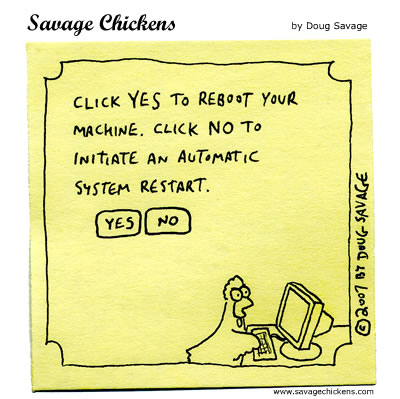
Reboot or restart?

I find this funny for two reasons.

  • It spoofs the “choice” that many error messages present to us. It amounts to: “The program failed. OK?” It’s not OK, but your only choice is to “agree” with the message.
  • It spoofs the developer jargon that we read in error messages: a reboot versus a system restart.

Ten-year-old advice

Fresh advice, still:

“Usability goals are business goals. Web sites that are hard to use frustrate customers, forfeit revenue, and erode brands.

Executives can apply a disciplined approach to improve all aspects of ease-of-use. Start with usability reviews to assess specific flaws and understand their causes. Then fix the right problems through action-driven design practices. Finally, maintain usability with changes in business processes.”

—McCarthy & Souza, Forrester Research, September 1998

How to test earlier

Involving users throughout the software-development cycle is touted as a way to ensure project success. Does usability testing count as user contact? You bet! But since most companies test their products later in the process, when it’s difficult to react meaningfully to the user feedback, here are two ways to get your testing done sooner.

Prioritise. Help the Development team rank the importance of the individual programming tasks, and then schedule the important tasks to complete early.

  • Prioritise and schedule the tasksIf a feature must be present in order to have meaningful interaction, then develop it sooner.
  • For example, email software that doesn’t let you compose the message is meaningless. To get meaningful feedback from users, they need to be able to type an e-mail.

    Developers often want to start with the technologically risky tasks. Addressing that risk early is good, but it must be balanced against the risk of a product that’s less usable or unusable.

  • If a feature need not be present or need not be working fully in order to have meaningful interaction, then provide hard-coded actions in the interim, and add those features later.
  • For example, if the email software lets users change the message priority from Standard to Important, hard-code it for the usability test so the priority is always Standard.

  • If a less meaningful feature must to be tested because of its importance to the business strategy, then develop it sooner.
  • For example, email software that lets users record a video may be strategically important for the company, though users aren’t expected to adopt it widely until most laptops ship with built-in cameras.

Schedule. For each feature to be tested, get the Development team to allocate time to respond to usability recommendations, and then ensure this time is neither reallocated to problem tasks, nor used up during the initial development effort of the to-be-tested features. Engage the developers by:

  • Sharing the scenarios in advance.
  • Updating them on your efforts to recruit usability-study participants.
  • After developers incorporate your recommendations, retesting and then reporting improvements in user performance.

Development planning that prioritises programming tasks based on the need to test, and then allows time in the schedule to respond to recommendations, is more likely to result in usable, successful products.

Usability, not drowning

Is it a usability experiment? Are they testing the theory that a baby in a bucket won’t fall over as easily as a baby in a bath?

babies-in-buckets

Photo from Yahoo.co.jp news.

Actually, it’s a photo that accompanies a news story about babies in IJmuiden, The Netherlands, whose parents were learning baby massage. The warm bath in advance is supposed to make them feel like when they were in the uterus.

Common tasks losing usability

There’s been a loss of usability for people who type text.

Like me, you may have experienced these unwelcome experiences:

  • After typing a long message in Facebook, when I click send, I get a page error and my entire message is lost.
  • After typing a post in WordPress, if the server has gone down or I press an unintended keyboard shortcut, I lose my entire post.

By comparison, if Word stops responding, it will (try to) offer me my unsaved changes when I reopen the document.

With users increasingly doing their work in browsers, why don’t browsers remember the text we were typing? Or why doesn’t the operating system? Or why doesn’t the weblication make backups? Or the server?

When my actions in a browser fail, imagine a message such as this:

Supporting the user after a failure in the browser

This hints at just one possible solution. In the spirit of Five Sketches™, I bet you can come up with at least five more ways to support users after they’ve lost the work they typed in a browser.

Which user involvement works

User-centred design (UCD) advocated involving users in the design process. Have you wondered what form that user involvement could take, and which forms lead to the most successful outcomes?

I recently came across data that Mark Keil published a while ago. He surveyed software companies and correlated project outcomes with the type of user access that designers and developers had.

Type of contact with users Effectiveness
  For custom software projects
  Facilitate teams, hold structured workshop with users, or use joint-application development (JAD). ██████████
  Expose users to a UI prototype or early version to uncover any UI issues. ██████
  Expose users to a prototype or early version to discover the system requirements. ████
  Hold one-on-one semi-structured or open-ended interviews with users. ████
  Test the product internally (acceptance testing rather than QA testing for bugs) to uncover new requirements. ██
  Use an intermediary to define user goals and needs, and to convey them to designers and developers. ██
  Collect user questions, requirements, and problems indirectly, by e-mail or online locations.
  For packaged or mass-market software projects
  Listen to live/synchronous phone support, tech-support, or help-desk calls. ████████
  Hold one-on-one semi-structured or open-ended interviews with users. ██████
  Expose users to a UI prototype or early version to uncover any UI issues. ████
  Convene a group of users, from time to time, to discuss usage and improvements. ████
  Expose users to a prototype or early version to discover the system requirements. ██
  Test the product internally (acceptance testing rather than QA testing for bugs) to uncover new requirements. ██
  Consult marketing and sales people who regularly meet with and listen to customers. ██
  At trade shows, show a mock-up or prototype to users and get their feedback.
Not reported as effective in this 1995 source
  Conduct a (text) survey of a sample of users.
  Conduct a usability test to “tape and measure” users in a formal usability lab. (This study precedes such products as TechSmith Morae.)
  Observe users for an extended period, or conduct ethnographic research.
  Conduct focus groups to discuss the software.

Although Keil’s article includes quantitative data, his samples are small. I opted to show only the relative usefulness of various methods. My descriptions, above, are long because the original article uses 1995 terms that have shifted in meaning. I believe some of the categories now overlap, due to changes in technology and method. For example, getting users to try a prototype of the UI in order to uncover UI issues sounds like the early usability testing that I do with TechSmith Morae, yet the 1995 results gave these activities very different effectiveness ratings.

For details, see the academic article by Mark Keil (Customer-developer links in software development). Educational publishers typically require a fee for access.

These methods also relate to research I’m doing on epistemology of usability analysis.