
Low-fi sketching increases user input

Here are three techniques for eliciting more feedback on your designs:

  • show users some alternatives, so more than one design.
  • show users a low-fidelity rather than high-fidelity rendering.
  • ask users to sketch their feedback.

To iterate and improve the design, you need honest feedback.  Let’s look at how and why each of these techniques might work.

Showing alternative designs signals that the design process isn’t finished. If you engage in generative design, you’ll have several designs to show to users. Users are apparently reluctant to critique a completed design, so a clear signal that the process is not yet finished encourages users to voice their views, but only somewhat.

Using a low-fidelity rendering elicits more feedback than the same design in a high-fidelity rendering. Again, users are apparently reluctant to critique something that looks finished—as a high-fidelity rendering does.

hi-fi_vs_low-fi_sketching

The design is the same, but it feels more difficult to criticise the one on the right.

Asking users to sketch their feedback turns out to be the single most important factor in eliciting feedback. It’s not known why, because there hasn’t been sufficient published research, but I hypothesize that it’s because this is the most indirect form of criticism.

Where’s the evidence for sketched feedback?

The evidence is unpublished and anecdotal. The problem with unpublished data is that you must be in the right place at the right time to get it, as I was during the UPA 2007 annual conference when Bill Buxton asked the room for a show of hands. Out of about 1000 attendees, several dozen said they had received more and better design-related feedback by asking users to sketch than by eliciting verbal feedback.

When you ask a user: “Tell me how to make this better,” they shrug. When you hand them a pen and paper and ask: “Sketch for me how to make this better,” users start sketching. They suddenly have lots of ideas.

My own experience agrees with this. In Perth, Australia, I took sketches from a Five Sketches™ design session to a customer site for feedback. I also brought blank paper and pens, and asked for sketches of better ideas.

Not surprisingly, the best approach is to combine all three techniques: show users several low-fidelity designs, and then ask them to sketch ways to make the designs better.

Usability of a potential design

Three-quarters of the way through a Five Sketches™ session, to help iterate and reduce the number of possible design solutions, the team turns to analysis. This includes a usability analysis.

 generative-design-stage-3

After Œ informing and defining the problem  without judgement  and  generating and sketching lots of ideas  without judgment , it’s often a relief for the team to start Ž  analysing and judging  the potential solutions by taking into account the project’s business goals, development goals, and usability goals).

But what are the usability goals? How can a team quickly assess whether potential designs meet those usability goals? One easy answer is to provide the team with an project-appropriate checklist.

Make your own checklist. You can make your own or find one on the Internet. To make your own, start with a textbook that you’ve found helpful and inspiring. For me, that’s About Face by Alan Cooper. To this, I add things that my experience tells me will help the team—my “favourites” or my pet peeves. In this last category I might consult the Ribbon section of the Vista UX Guide, the User Interface section of the  iPhone human-interface guidelines, and so on.

[local /wp-content/uploads/2009/04/make-usability-checklists.wmv]

Imagine users asking “Help me”

When you’re tempted to cut corners off your product, what do you cut?

Is it the usability?

Image derived from a photo by © Kacie KazerToday, I watched a video of people helping a motorised cardboard construction or “robot” to navigate. The so-called tweenbot has a flag on it that says “Help me,” and that asks people to send it on its way to its outdoor destination.

And people help it, time and again, get to where it “needs” to go.

On your next project, when you’re looking for corners to cut, I’d like you to imagine your future users wearing a sign that says “Help me.” Will that encourage you to help them?

The tweenbot pictured above is from Kacie Kinzer’s Tweenbots site, which creates a narrative about “our relationship to space and our willingness to interact with what we find in it.”

Teamwork reduces design risk

It takes a range of skills to develop a product. Each skill—embodied in the individuals who apply that skill—brings with it a different focus:

  • Product managers talk about features and market needs.
  • Business development  talk about revenue opportunities.
  • Developers talk about functionality.
  • Usability analysts talk about product- and user performance.
  • Interaction designers talk about the user experience.
  • QA talks about quality and defects.
  • Marketing talks about the messaging.
  • Technical communicators talk about information and assistance.
  • You may be thinking of others. (I’m sorry I’ve overlooked them.)

What brings all these together is design.

Proper design begins with information: a problem statement or brief, information about the targeted users and the context of use, the broad-brush business constraints, Design as a teamsome measurable outcomes (requirements, metrics, or goals), access to a subject-matter expert to answer questions about the domain and perhaps to present a competitor analysis.
Design continues by saturating the design space with ideas and, after the space is filled, analysing and iterating the ideas into possible solutions. The design process will raise questions, such as:

  • What is the mental model?
  • What are the use cases?
  • What is the process?

The analysis will trigger multiple rapid iterations of the possible solutions, as the possible solutions are worked toward a single design:

  • Development. What are the technical constraints? Coding costs? Effect on the stability of the existing code? Downstream maintenance costs?
  • Usability and experience. Does the design comply with heuristics? Does it comply with the standards of the company, the industry, and the platform? Does paper-prototyping predict that the designed solution is usable?
  • User experience. Will the designed solution be pleasing due to its quality, value, timeliness, efficiency, innovation, or the five other common measures of customer satisfaction?
  • Project sponsor. Is the design meeting the requirements? Is it reaching its goals or metrics?

It’s risky to expect one person—a developer, for example—to bring all these skills and answers to the table.  A team—properly facilitated and using an appropriate process—can reduce the risk and reliably produce great designs.

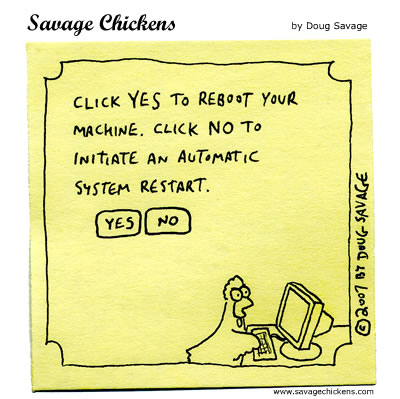
Reboot or restart?

I find this funny for two reasons.

  • It spoofs the “choice” that many error messages present to us. It amounts to: “The program failed. OK?” It’s not OK, but your only choice is to “agree” with the message.
  • It spoofs the developer jargon that we read in error messages: a reboot versus a system restart.

Are *five* sketches too many?

I first heard Bill Buxton talking about sketching in Texas, at the UPA 2007 annual conference. I was running around with a video camera asking people what they thought of Bill Buxton’s presentation. Everyone loved it, including his ideas on sketching and design. But almost everyone I spoke to also said Buxton’s requirement for five sketches was several sketches too many.

Buxton’s probably heard this objection a few times, because he addressed it at Mix09, last month in Nevada. He said:

Image derived from a screen capture of Mix09 videoI can hear your clients and your managers saying: “Well, Mr Buxton may have told you that you have to be able to do five different versions for every single question you’re asked—each one equally valid—but we can’t afford it because we’re already behind schedule. We don’t even have time to do one solution, and you’re telling me we have to do five?”

What are you going to say to them?

It’s a good question. Buxton also had an answer. “Doing multiples is critically important” because it’s how you saturate the design space with enough ideas to rapidly iterate to the best design solution. The challenge, says Buxton, is to balance “doing multiples” with the budget, with dollars, time, and personnel.

It comes down to technique.

Sketching is a fast, inexpensive, and therefore disposable way to capture ideas. And five really is key. In my experience, when I asked design participants for two or three sketches, they each brought “two”—actually versions of the same sketch where one had an extra squiggle or mark on the page. This is not how you saturate a design space. It has to be at least five—hence the name, Five Sketches™. The sketches have to be fast. They have to be low fidelity. The sketches have to be disposable.

Sketching is the right tool. You also need the right team, working at the right time. The right team has an understanding of generative design and knows that there’s a time to sketch, a time to iterate and analyse design ideas, and a time to code or program. (A team of three or four design participants can learn and practice everything but the programming in a half day.) In my experience, design participants—developers, QA staff, marketing staff, support staff—can sketch and produce great software and web designs as effectively as a graphic designer or industrial designer can.

Again: it comes down to technique. And since sketching is cheap, you can’t afford not to design.

Why pen+paper is better

When solving a software-design problem or a web-design problem, you get the best results from following a design process. I’m not referring to something I made up. I’m referring to something that people who are trained in “Design” will recognise as a design process. And such processes inevitably include divergence and convergence.

Divergence is the stage when the designer or design participants come up with ideas. Lots of ideas. Not just comfortable ones, but ideas that push at the edge of the envelope. Ideas without judgement.

Convergence is the stage when ideas are judged, rapidly iterated, assessed, and checked against the requirements.

In my experience, divergence is best done by sketching, with a pen on paper:

ideation-methods-on-a-graph

Sketching on paper with a wide-nib pen is best because this “technology” is familiar—it’s easy—and inexpensive. Everyone can Wide-nib markerhave a pen and paper, so there’s no need to wait your turn. Sketching is fast, so designers have little invested in any one sketch. Modifying or iterating any one of the ideas is easier to accept. Most importantly, for inexpert sketchers, the sketching process intrinsically discourages high-fidelity work and the wide-nib pen discourages sketching the fine detail that detracts design participants from getting the ideas out, fast.

Software that’s intended to help people “sketch” detracts from a good result. The software often lets users build prototypes with a great level of interaction detail. The problem with this: attention to detail is a distraction at the divergence stage. When filling the design space with ideas, it’s sufficient merely to evoke the idea and share it. Ambiguity actually helps the team see more than one idea in the same sketch; each interpretation of the idea can be iterated. Software that’s not intended to help people to “sketch” slows them down at the divergence stage—just when we need ideas to flow quickly. Divergence is about filling the design space with lots disposable ideas.

Read my blog post about why ideas are disposable.

Ten-year-old advice

Fresh advice, still:

“Usability goals are business goals. Web sites that are hard to use frustrate customers, forfeit revenue, and erode brands.

Executives can apply a disciplined approach to improve all aspects of ease-of-use. Start with usability reviews to assess specific flaws and understand their causes. Then fix the right problems through action-driven design practices. Finally, maintain usability with changes in business processes.”

—McCarthy & Souza, Forrester Research, September 1998

How to test earlier

Involving users throughout the software-development cycle is touted as a way to ensure project success. Does usability testing count as user contact? You bet! But since most companies test their products later in the process, when it’s difficult to react meaningfully to the user feedback, here are two ways to get your testing done sooner.

Prioritise. Help the Development team rank the importance of the individual programming tasks, and then schedule the important tasks to complete early.

  • Prioritise and schedule the tasksIf a feature must be present in order to have meaningful interaction, then develop it sooner.
  • For example, email software that doesn’t let you compose the message is meaningless. To get meaningful feedback from users, they need to be able to type an e-mail.

    Developers often want to start with the technologically risky tasks. Addressing that risk early is good, but it must be balanced against the risk of a product that’s less usable or unusable.

  • If a feature need not be present or need not be working fully in order to have meaningful interaction, then provide hard-coded actions in the interim, and add those features later.
  • For example, if the email software lets users change the message priority from Standard to Important, hard-code it for the usability test so the priority is always Standard.

  • If a less meaningful feature must to be tested because of its importance to the business strategy, then develop it sooner.
  • For example, email software that lets users record a video may be strategically important for the company, though users aren’t expected to adopt it widely until most laptops ship with built-in cameras.

Schedule. For each feature to be tested, get the Development team to allocate time to respond to usability recommendations, and then ensure this time is neither reallocated to problem tasks, nor used up during the initial development effort of the to-be-tested features. Engage the developers by:

  • Sharing the scenarios in advance.
  • Updating them on your efforts to recruit usability-study participants.
  • After developers incorporate your recommendations, retesting and then reporting improvements in user performance.

Development planning that prioritises programming tasks based on the need to test, and then allows time in the schedule to respond to recommendations, is more likely to result in usable, successful products.